

Children like to play in a sandbox. Computer users should also play in sandboxes… to increase their security! A sandbox is a mechanism (a software) used to execute untrusted applications. A sandbox can be seen as a light-virtualization system. True virtualization (performed with products like VMware, VirtualBox or Virtual PC) is a different way to work: You run several instances of one or more operating system on the same hardware platform. With a sandox, you just protect some resources (memory, devices or file systems) from being used by the untrusted program.
Why use a sandox?
All untrusted or dangerous applications should be run in a sandbox! Personally, I run the following applications “sandboxed”:
- Web browsers (Firefox as Internet Explorer)
- Instant Messenging client
- Untrusted applications
How does it work?
Have a look at the following schema:
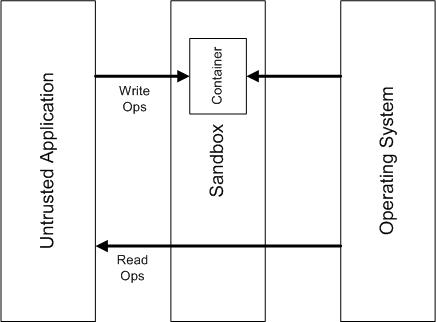 |
When running “sandboxed”, the application does not have a direct write access to the computer resources (Files, Disk Devices, Registry Keys, Process and Thread objects, Driver objects, and objects used for Inter-process communication: Named Pipes and Mailbox Objects, Events, Mutexs (Mutants in NT speak), Semaphores, Sections and LPC Ports). Read operations are simple: data are fetched directly from the OS. Write operations are intercepted and data are stored in the container only. Finally, for updates, first a copy of the data is fetched from the OS and updated in the container.
Other restrictions can be applied:
- Restrict Internet access.
- File access granularity (direct access, full access, blocked or read-only) per files or directories.
- Access to the registry (direct, blocked, read-only).
- IPC
- Other windows.
- Low level (ex: to load kernel modules).
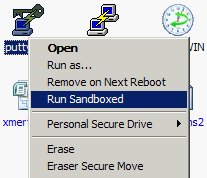
The sandbox can be configured to automatically start specific application “sandboxed” like a web browser. All process started by a sandboxed applications will remain in the same sandbox. For other applications, you can use a shell integration and a new option will be available from Explorer:
It’s really easy to test applications. Once installed, you don’t need to un-install it, just delete the sandbox content and your system will remain clean (like the snapshot feature of VMware). There are also mechanisms to retrieve files from a sandbox (example: when you downloaded a file from the Internet). Recovery can be automatic or manual (based on directories). You can also browse the content of a sandbox.
Tip: there is no limitation of sandboxes, create one per “application group” (ex: browsers, internet, suspicious, …). It’s impressive to see the amount of files a Windows application can create!
The Sandbox I use is Sandboxie.
Trusting sandboxie sounds good, however, how can you trust sandboxie itself, as it is not open source?
selc
Great summary of sandboxing. I’m a huge fan of sandboxie and use it all the time too.
-Christian