Transparent IP renumbering with iptables

Contact: xavier at rootshell dot be

Table of contents


History

2005/04/15Page created

Introduction Sometimes, IP networks need to be reconfigured for multiple reasons: subnets too small, migration to new platform, split to several sites, ...
This means that all devices must have their IP address changed. If DNS are used and properly updated, changes have a minimum impact but problems may occur: I will explain here how to avoid "unreachability" problems during IP migrations: the servers moved to the new network will always be reachable via their old IP. This will able a smooth transfert and allow administrators to detect which clients are still using the old IP's and take proper actions without stress.

One of the requirements is to keep the server config "clean": no extra IP address to configure, nor firewall or routing table. This means that it works with any OS, any platform.


Disclaimer This setup worked with my network and should work with all topology. It's provided "as is". Please use it carrefully. I cannot be held responsible for any outages on your network!

Requirements


How to?

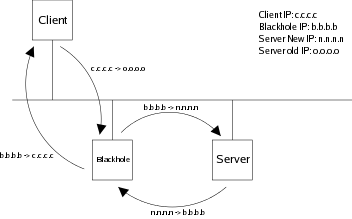
The principle is very easy: The new Linux box, called from now, the blackhole will receive all traffic sent to the old servers addresses and forward it to the new ones: Via iptables, we need to perform two changes on the packets:

Blackhole Schema


Example Assume the following information:
  • Old network: 10.50.10.0/24;
  • New network: 10.50.200.0/24;
  • Server address changed from 10.50.10.250 to 10.50.200.250;
  • Blackhole address: 10.50.10.240;
  • The blackhole has only one interface;
First enable IP forwarding on the blackhome:

blachhole# echo '1' > /proc/sys/net/ipv4/ip_forward

Once the server moved to the new IP range, configure its old IP on the blackhole:

blackhole# ifconfig eth0:0 10.50.10.250 netmask 255.255.255.0 up

Define the iptables rules. The first one will rewrite all incoming packets, the second one will rewrite all outgoing packets.

blackhole# iptables -t nat -A PREROUTING -i eth0 -d 10.50.10.250/32 -j DNAT --to 10.50.200.250
blackhole# iptables -t nat -A POSTROUTING -o eth0 -d 10.50.200.250/32 -j SNAT --to-source 10.50.10.240

If you have a firewall enabled, don't forget to allow all incoming traffic to the old server address!

blackhole# iptables -t filter -A INPUT -i eth0 -d 10.50.10.250 -j ACCEPT

Important notes:
  • In this example, I'm using the same interface for incoming and outgoing traffic. But you can split them accross multiple interface.
  • Connections from the server will come from the blackhole IP! Don't forget to adapt local security! (access lists, ...)
Now, start a tcpdump on the blackhole and, from a client, try to connect to the old server IP:

blackhole# tcpdump -i eth0 host 10.50.10.250 or host 10.50.200.250

You should see something like this: (the client is 10.50.10.242)

09:22:33.629272 arp who-has 10.50.10.250 tell 10.50.10.242
09:22:33.629537 arp reply 10.50.10.250 is-at 00:30:f1:02:89:af
09:22:33.629313 IP 10.50.10.242.36299 > 10.50.10.250.ssh: S 2775584351:2775584351(0) win 5840 
09:22:33.629577 arp who-has 10.50.200.250 tell 10.50.10.240
09:22:33.630526 arp reply 10.50.200.250 is-at 00:50:8b:6a:6b:fc
09:22:33.630541 IP 10.50.10.240.36299 > 10.50.200.250.ssh: S 2775584351:2775584351(0) win 5840 
09:22:33.630790 IP 10.50.200.250.ssh > 10.50.10.240.36299: S 3980706886:3980706886(0) ack 2775584352 win 5792 
09:22:33.630852 IP 10.50.10.250.ssh > 10.50.10.242.36299: S 3980706886:3980706886(0) ack 2775584352 win 5792 


Help

Feel free to report comments or suggestions to this project. If you need help, feel free to contact me.